iFocus Launcher brings an iOS-style look and cleaner app access
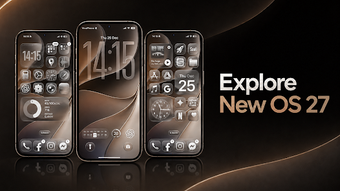
iFocus Launcher - OS Themes, developed by Revoto, transforms the Android home screen into an iOS-inspired environment for everyday use. The launcher focuses on visual polish and simplified navigation, offering high-resolution themes, icon masking for a uniform appearance, and a search tool to reach apps or contacts quickly. It targets Android users who prefer minimalist, gesture-driven setups and a tidy, consistent home screen for daily app access.
How the launcher shapes daily visuals and layout
The launcher emphasizes a uniform home screen, using icon masking and a curated set of HD wallpapers to create a matched look across apps, a point the developer highlights as central to the design. It pairs that aesthetic with integrated utility tools, so the interface aims to feel like a single operating-system skin rather than a patchwork of themes, which helps users who value consistent presentation every time they unlock the device.
What organization tools help you find apps fast
Organization focuses on automatic grouping and quick discovery: apps are categorized into automatic groups such as social, tools, and games, while folder creation works by dragging an icon onto another. The launcher includes a Smart Search that locates apps and contacts, which shortens the steps needed to open frequently used items during a busy day without navigating through multiple screens.
Will it run smoothly on a range of Android devices
Compatibility requires Android 7.0 or higher for full functionality, and the developer notes a lightweight design that is optimized for smooth transitions on various hardware. The launcher uses fluid, OS-style animations and icon masking techniques that aim to preserve performance on midrange devices, so users with older phones that meet the version requirement should still see responsive home-screen interactions.
How the launcher treats privacy and hidden apps
Privacy is an explicit design point: the developer states the launcher does not collect personal data, files, or app usage patterns. Beyond that policy, the tool provides an app-hiding feature so users can remove sensitive icons from the main screen. Those two elements address common daily concerns about visible apps and background data handling when customizing a phone’s launcher.
To sum up, a focused choice for visual consistency and tidy daily access
iFocus is a tasteful option for Android users who want a consistent, OS-like home screen and neater daily navigation. Consider whether deep third-party workflow integrations are essential, since Revoto positions the product within a personalization and utility portfolio. To sum up, the launcher fits people who prioritize visual consistency and straightforward daily access rather than extensive external integrations.